There’s no time to pull in a contractor for every house you run comps for. But you need to be accurate enough to make a buying decision.
The typical model that’s taught is a price per square foot model. Those break down quickly when you get into the details.
That’s why I created this app. You can have it for free. Here’s how to use it.
When to Use the Scope of Work App
There are 3 different points in a project that you will need to refine your SOW/Budget:
- Deal Analysis
- Due Diligence
- Project Management
With each level the scope gets refined. This calculator is about Deal Analysis. “Should I buy this house” or “Here is what I can pay for that house.”
More of a sketch than a blueprint.
Just think about going on a 10 day international vacation. You automatically have general idea of the rest of the costs:
- Hotel – 200 per night
- Food – 100 per night
- Entertainment – 200 per day
- Drinks – priceless
But it’s the plane tickets you start with. That’s the deal breaker. Is it a few hundred bucks for tickets or a few thousand?
Based on the plane ticket and my rough figuring of the rest of the vacation I know whether or not to move forward making plans. Eventually I’ll figure out exactly what hotels to stay at.
This is exactly how to work a budget on a house.
4 Banks of Jobs on Every Renovation Project
There are 4 Banks of Jobs on every project:
- Quick 6 – Defines the flip type
- Auto Adds – Add to every rehab
- Replacements – Sets the design of every project
- Extras – Most common one-offs
Every scope of work starts with a blurry vision and budget. Your goal here is to determine a purchase price quickly. Later in the process you will refine a full scope of work
Principles and Definitions
Job is like flooring or electrical. Jobs live inside of Projects (123 Main Street Rehab).
Most jobs have 3 options
- As-is. Leave it
- Repair. Keep what’s existing but improve it
- Replace. Demo what’s existing. Start new.
Every job and price begins at a standard price that will work in most situations. Some are worse than others. For those you add severity.
Severity also works in the opposite direction.
At the bottom of the app you will find house information. Square Footage and bathrooms. That’s all you’ll need for a quick budget.
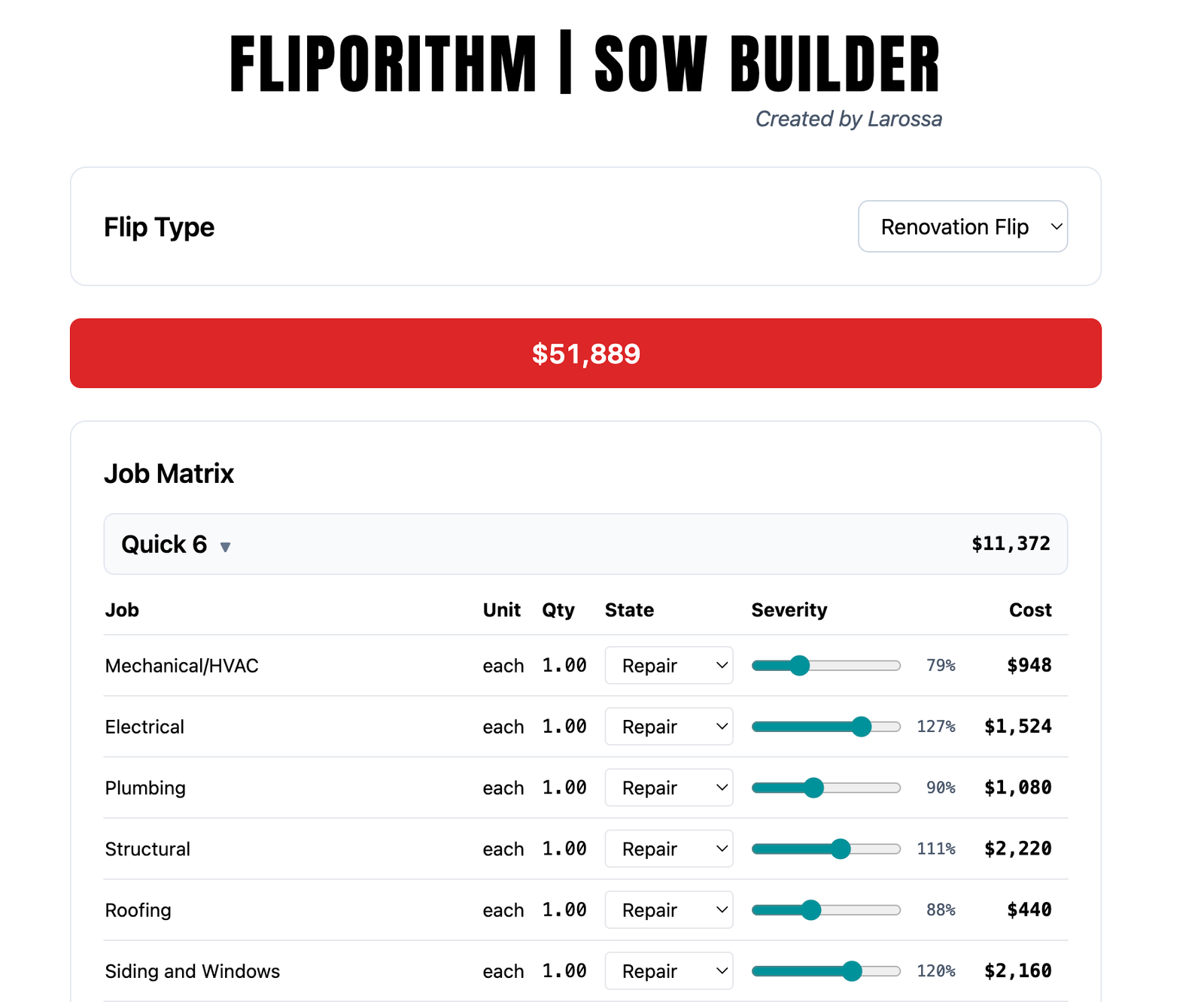
The Quick 6
Here’s your plane ticket.
I know I have a cosmetic rehab on my hands if all of these are in good shape:
- Mechanical/HVAC
- Electrical
- Plumbing
- Stuctural
- Roofing
- Siding & Windows
I leave a small budget in the Quick 6 even if I don’t think anything is needed. Only repairs and the severity is turned all the way down.
On projects that require most or all of the Quick 6 you will be doing a Gut Flip.
When you have a Gut. Drywall, Demo and Insulation will be added automatically.
Each of these jobs can be anywhere from 8-12K plus. You see how the price per square foot model can easily erode.
Auto Adds
I add this list to every rehab project with the exception of a Landlord (Safety and Liability only) Flip.
This is the icing on the cake.
- Flooring – LVP
- Interior Paint
- Hardware & Fixtures
- Landscaping Basic
- Handyman Punchlist
- Construction Clean
Replacements
Here are where you make design choices. If you follow the Solo House Flipper model, you know that this bank will get you in some big trouble.
The goal is to look at what other houses in the neighborhood have installed in their flipped properties and do the Baseline. Pushing past that is wasted money.
- Trim & Doors
- Cabinets
- Countertops
- Backsplash
- Shower/Tub
- Bathroom Vanity
- Exterior Paint
- Gutters
The decision between As-is, Repair, and Replace is the key here.
Extras
The most common “one-off” jobs for every rehab project. All flip types are pre-set to have none of these added.
Add with care.
- Framing Modification
- Deck
- Fence
- Garage Door
- Shower Door
- Tree Removal
- Clean Out
- Drainage
Scale of Livability
The Scale of Livability shows you where you’re starting and finishing based upon the flip type.
Advanced Financials
Always add a financial contingency. It’s preset at 10%. There will always be surprises. Be conservative.
Sometimes you may want to add some Juice.
I use this SOW Builder in conjunction with The Flippin’ Calc to make offer on houses.
In some cases I’m standing in front of the seller using these calculators to make an offer. That’s where I may add The Juice to set a lower anchor price for negotiations.
Solo House Flipper
I hope you use these tools to go make offers on houses.
I talk with a lot of people who are just getting into the business. Uncertainty stops a lot of them from getting started.
These are the same tools that I use after buying 100s of houses. They work. Use them. Get started.